

CLAUDE.md ולעבוד עם rules, הרי שכאן אנחנו עושים צעד משמעותי קדימה.בחלק זה נלמד כיצד עוברים מ-prompt חד פעמי ליכולת שניתן להשתמש בה שוב ושוב, באמצעות Claude Code Skills. במקום לכתוב בכל פעם מחדש הוראה ארוכה כמו "נתח את פניית הלקוח בצורה מסודרת", נבנה Skill קבוע שמגדיר ל-Claude בדיוק איך לבצע משימה מקצועית בכל פעם. נמשיך לעבוד עם פרויקט המעבדה של חנות המובייל והמחשבים שבנינו בחלק הראשון, נבנה שני Skills שונים, ואף נראה כיצד אפשר לבדוק שהתוצרים עומדים בסטנדרט שהגדרנו.
הבנת ההבדל: CLAUDE.md, Rules ו-Skills
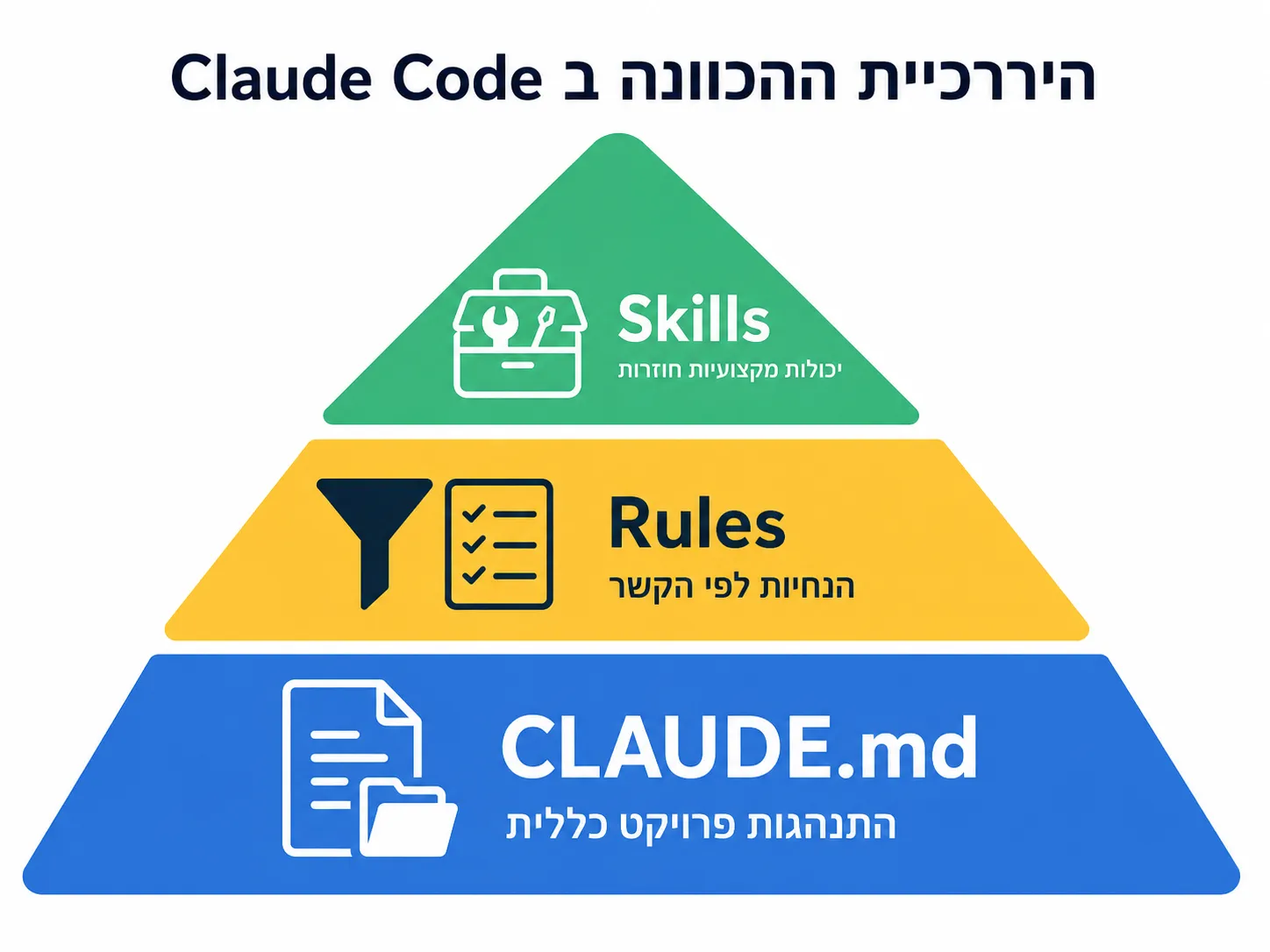
לפני שנצלול לבנייה, חשוב להבין את ההיררכיה של מנגנוני ההכוונה השונים ב-Claude Code, ומתי כדאי להשתמש בכל אחד מהם.
- CLAUDE.md – התנהגות הפרויקט:
- זהו הקובץ שמגדיר את ההתנהגות הכללית של הפרויקט. הוא מספק הקשר רחב על מה הפרויקט עושה, איך הוא בנוי, ומהן ההנחיות הגלובליות.
- Rules – הנחיות לפי הקשר:
- חוקים שמתווספים באופן ממוקד לפי סוג קובץ או הקשר ספציפי. לדוגמא, חוק שמופעל רק כשעובדים על קבצי פניות לקוח תחת
data/requests/**/*.md.
- חוקים שמתווספים באופן ממוקד לפי סוג קובץ או הקשר ספציפי. לדוגמא, חוק שמופעל רק כשעובדים על קבצי פניות לקוח תחת
- Skills – יכולות מקצועיות חוזרות:
- אלו יכולות ממוקדות שמגדירות איך לבצע משימה מקצועית מסוימת באופן עקבי. Skill טוב אינו prompt ארוך, אלא יכולת ממוקדת עם שם, תיאור, הוראות ולעיתים קבצי עזר.
כדי להמחיש את העיקרון: במקום לבקש שוב ושוב "קרא את הפנייה, תבין את הצורך, חלץ תקציב, זהה מה חסר ואל תמליץ עדיין", אנחנו ניצור Skill בשם customer-intake שתמיד יחזיר ניתוח במבנה קבוע ועקבי.
למודל המלא בן 5 השלבים בהכוונת Claude Code – ניתן לעיין במדריך עושים סדר בקלוד.
בדיקת Baseline לפני יצירת Skill
לפני שנבנה את ה-Skill, חשוב לראות מה קורה כשמבקשים מ-Claude לבצע את המשימה ללא יכולת מוגדרת. זה ייתן לנו נקודת ייחוס להשוואה.
- הרצת הבדיקה הראשונית:
- פתחו את Claude Code בפרויקט המעבדה.
- הריצו את הפקודה הבאה:
Read data/requests/request-01-student-laptop.md and extract the customer need, budget, use case, missing information, and next step. Do not recommend products yet.
- מה לשים לב אליו:
- Claude אכן מסוגל לבצע את המשימה ולחלץ את המידע הרלוונטי.
- אבל – אין כאן יכולת מוגדרת וקבועה שניתן יהיה להשתמש בה שוב בעתיד.
- בכל פעם נצטרך לנסח מחדש את כל ההוראות, ואין הבטחה שהפלט יהיה במבנה זהה.
בניית ה-Skill הראשון באופן ידני
כעת נבנה את ה-Skill בשם customer-intake ביד. חשוב לבצע זאת ידנית כדי להבין את המבנה לעומק, ולא להשתמש בסקריפט שיוצר הכל אוטומטית.
- יצירת מבנה התיקיות:
- צרו תיקיה חדשה בפרוייקט בנתיב הבא:
.claude/skills/customer-intake - צרו בתוך התיקייה שלושה קבצים ריקים בשמות הבאים:
.claude/skills/customer-intake/SKILL.md
.claude/skills/customer-intake/output-template.html
.claude/skills/customer-intake/examples.md
- צרו תיקיה חדשה בפרוייקט בנתיב הבא:
- כתיבת קובץ SKILL.md:
זהו הקובץ המרכזי שמגדיר את היכולת. העתיקו לתוכו את התוכן הבא:
---
name: customer-intake
description: Analyze a raw customer request for the mobile-store-lab project, read the required project context files, create a browser-ready HTML intake report, save it under outputs, and open it in the browser. Use this when the user asks to analyze, intake, process, or summarize a customer request. This skill does not create a final customer reply and does not make a final product recommendation.
argument-hint: "[request-file-path or raw-customer-request]"
disable-model-invocation: true
---

# Input

The user input is:

```text
$ARGUMENTS
```

If $ARGUMENTS is empty, ask the user for the customer request file path and stop.

# Customer Intake Skill

You are a customer intake specialist for a mobile and computer store.

Your job is to read a customer request, understand the real need, check the relevant project context, and create a clean HTML intake report for human review.

You do not write a final reply to the customer.
You do not make a final product recommendation.
You prepare the next human or agent to continue the workflow.

---

## Relationship to project rules

This project may include a rule under `.claude/rules/customer-requests.md` that applies when reading files under `data/requests/**/*.md`.

That rule provides basic request-analysis discipline.

When this skill is explicitly used:

- Follow all factual and safety constraints from `CLAUDE.md`, `AGENTS.md`, and relevant rules.
- Do not invent customer details, products, prices, or stock.
- Separate what the customer said from what you infer.
- If a rule suggests a different output structure, this skill's HTML template controls the output format.
- The final artifact must be HTML, not Markdown.

---

## Required files to read first

Before producing the output, always read these files:

1. The customer request file provided by the user.
2. `data/catalog/products.json`
3. `docs/store-policy.md`
4. `docs/sales-guidelines.md`
5. `.claude/skills/customer-intake/output-template.html`
6. `.claude/skills/customer-intake/examples.md`

If one of these files is missing, stop and report which file is missing.

---

## Analysis goals

Extract and separate:

1. Customer situation
2. Explicit requests
3. Hidden or implied needs
4. Budget signals
5. Relevant product categories
6. Catalog and stock signals
7. Missing information
8. Recommended next step
9. What must not be done yet

## Catalog and stock behavior

When reading `data/catalog/products.json`, always check:

1. Which relevant product categories exist in the catalog.
2. Which relevant products appear to be in stock.
3. Which relevant products are out of stock or have low stock.
4. Whether the customer's requested item has any matching catalog option.
5. Whether the catalog creates a constraint for the next stage.

At the intake stage, do not choose a final product.

You may write stock-aware signals such as:

- "The catalog includes laptop options that are currently in stock."
- "The catalog includes a Samsung fast charger with available stock."
- "The tablet option exists, but may not fully replace a laptop for the stated use case."
- "Stock should be verified again before sending a final offer."

Do not say:

- "The customer should buy this exact product."
- "This is the final recommendation."
- "Send this answer to the customer."

---

## Output requirements

Always create a complete standalone HTML file.

The file must:

- Use the template in `output-template.html`.
- Include inline CSS from the template.
- Look good when opened directly in a browser.
- Include the source request filename.
- Include a clear "Human review required" status.
- Be saved under the `outputs/` directory.
- Use this naming pattern:

```text
outputs/customer-intake-.html
```

### Example:
outputs/customer-intake-request-01-student-laptop.html

## Browser opening requirement

After creating the HTML file, immediately open it in the default browser, using the actual generated file path.

## Final response to the user

After saving and opening the HTML file, respond briefly with:

The output file path.
A one-sentence summary of what was identified.
A note that this is intake only, not a final recommendation.

Do not paste the full HTML in the chat unless the user asks.
שימו לב: החלק הפותח של הקובץ נקרא frontmatter. הוא חלק קצר מאוד וכולל הגדרות כלליות על ה Skill. חלק זה עוזר ל Claude Code להחליט בעצמו מתי להשתמש ב Skill. בזמן יצירת סשן חדש – נטענים כל ה frontmatters של הסקילים השונים, ורק במידת הצורך – קלוד-קוד מחליט לטעון את תיאור ה Skill המלא.
חלק זה כולל גם הגדרות פרמטרים (כמו request במקרה שלנו), והגדרות הרצה כמוdisable-model-invocation: true, שאומר ל Claude-Code להשתמש בסקיל הזה אך ורק בבקשה מפורשת מהמשתמש.
הוספת קבצי עזר (Supporting Files)
אחד היתרונות החשובים של Skills הוא שאינם חייבים להכיל את כל ההקשר בתוך SKILL.md. אפשר ורצוי להפריד תבניות ודוגמאות לקבצים נלווים, מה שהופך את ה-Skill לנקי ומודולרי יותר.
- הגדרת תבנית הפלט – output-template.html:
קובץ זה יכיל את התבנית המדויקת של מבנה הפלט. העתיקו לתוכו:
<!doctype html> <html lang="en" dir="ltr"> <head> <meta charset="utf-8"> <title>Customer Intake Report</title> <meta name="viewport" content="width=device-width, initial-scale=1"> <style> :root { --bg: #f6f7f9; --card: #ffffff; --text: #1f2937; --muted: #6b7280; --border: #e5e7eb; --accent: #2563eb; --warning: #f59e0b; --danger: #dc2626; --success: #059669; } body { margin: 0; padding: 32px; background: var(--bg); color: var(--text); font-family: Arial, Helvetica, sans-serif; line-height: 1.55; } .page { max-width: 980px; margin: 0 auto; } .header { background: linear-gradient(135deg, #111827, #1f2937); color: white; padding: 28px; border-radius: 18px; margin-bottom: 24px; } .header h1 { margin: 0 0 8px; font-size: 32px; } .header p { margin: 0; color: #d1d5db; } .meta { display: grid; grid-template-columns: repeat(3, 1fr); gap: 14px; margin-bottom: 24px; } .meta-card, .section { background: var(--card); border: 1px solid var(--border); border-radius: 16px; padding: 18px; box-shadow: 0 8px 20px rgba(15, 23, 42, 0.04); } .meta-label { color: var(--muted); font-size: 13px; margin-bottom: 4px; } .meta-value { font-weight: 700; } .status { display: inline-block; padding: 6px 10px; border-radius: 999px; background: #fff7ed; color: #9a3412; font-weight: 700; font-size: 13px; } .grid { display: grid; grid-template-columns: 1fr 1fr; gap: 18px; margin-bottom: 18px; } .section { margin-bottom: 18px; } .section h2 { margin: 0 0 10px; font-size: 20px; border-bottom: 1px solid var(--border); padding-bottom: 8px; } ul { margin-top: 8px; padding-left: 22px; } .tag { display: inline-block; margin: 4px 6px 4px 0; padding: 5px 9px; border-radius: 999px; background: #eff6ff; color: #1d4ed8; font-size: 13px; font-weight: 700; } .danger { border-left: 5px solid var(--danger); } .warning { border-left: 5px solid var(--warning); } .success { border-left: 5px solid var(--success); } .footer { color: var(--muted); font-size: 13px; text-align: center; margin-top: 28px; } @media (max-width: 760px) { body { padding: 16px; } .meta, .grid { grid-template-columns: 1fr; } } </style> </head> <body> <main class="page"> <header class="header"> <h1>Customer Intake Report</h1> <p>Structured intake analysis for the mobile and computer store workflow.</p> </header> <section class="meta"> <div class="meta-card"> <div class="meta-label">Source request</div> <div class="meta-value">{{SOURCE_REQUEST}}</div> </div> <div class="meta-card"> <div class="meta-label">Generated file</div> <div class="meta-value">{{OUTPUT_FILE}}</div> </div> <div class="meta-card"> <div class="meta-label">Status</div> <div class="status">Human review required</div> </div> </section> <section class="grid"> <div class="section"> <h2>Customer Situation</h2> <p>{{CUSTOMER_SITUATION}}</p> </div> <div class="section"> <h2>Budget Signals</h2> <p>{{BUDGET_SIGNALS}}</p> </div> </section> <section class="section"> <h2>Explicit Requests</h2> <ul> {{EXPLICIT_REQUESTS}} </ul> </section> <section class="section"> <h2>Hidden Needs</h2> <ul> {{HIDDEN_NEEDS}} </ul> </section> <section class="section"> <h2>Product Direction</h2> <p>{{PRODUCT_DIRECTION}}</p> <div> {{PRODUCT_TAGS}} </div> </section> <section class="section warning"> <h2>Catalog & Stock Signals</h2> <p>{{CATALOG_STOCK_SIGNALS}}</p> <p><strong>Stock note:</strong> Stock is based only on the current catalog file and should be verified before a final customer offer.</p> <p><strong>Important:</strong> These are intake signals only, not a final product recommendation.</p> </section> <section class="section danger"> <h2>Missing Information</h2> <ul> {{MISSING_INFORMATION}} </ul> </section> <section class="section success"> <h2>Recommended Next Step</h2> <p>{{RECOMMENDED_NEXT_STEP}}</p> </section> <section class="section danger"> <h2>Do Not Do Yet</h2> <ul> {{DO_NOT_DO_YET}} </ul> </section> <footer class="footer"> Generated by the customer-intake skill. Intake only. Not a final customer-facing response. </footer> </main> </body> </html> - הוספת דוגמא – examples.md:
קובץ זה יכיל דוגמא קצרה של פניית לקוח ותוצר טוב המבוסס עליה, כדי לכוון את Claude לאיכות הרצויה. העתיקו לתוכו:
# Customer Intake Examples

## Example request

```text
Hi,
I need a laptop for my daughter. She starts college next month.
Not too expensive, but I want it to last a few years.
She uses Office, Zoom, browser, and sometimes edits short videos.
Maybe an iPad is better? I’m not sure.

Also, my Samsung charger broke. I need a fast charger, but not something too expensive.
```

### Good analysis behavior

A good intake report should identify:

The main need is a study device for college.
The customer is unsure between laptop and tablet.
The customer cares about price, but also durability.
Light video editing creates a performance consideration.
The Samsung charger is a secondary request.
The budget is not stated clearly.
The next step is to clarify budget and preference between laptop and tablet.

### Bad analysis behavior

Avoid:

Recommending a final specific product at the intake stage.
Ignoring the charger request.
Treating “not too expensive” as an exact budget.
Assuming the daughter must buy a laptop without explaining the tablet dilemma.
Writing a final reply to the customer.
Inventing products that are not in data/catalog/products.json.

### Example catalog signal wording

Good:

The catalog includes laptop, tablet, and charger options that may be relevant. A laptop direction appears stronger for Office, Zoom, browser work, and light video editing, while the tablet may fit note-taking but may be weaker as the only study device.

Bad:

The customer should buy the Lenovo laptop and Samsung charger.
בדיקת ה-Skill בפעולה
לאחר שבנינו את ה-Skill על כל חלקיו, הגיע הזמן לבדוק שהוא אכן עובד כצפוי.
לפני כן – יש לוודא שה skill החדש נטען. ניתן לעשות זאת ב 3 דרכים, השתמשו בהם לפי סדר זה, בהתאם לצורך:
- פתיחת סשן חדש
- שימוש בפקודת
/reload-skillsבחלון השיחה של Claude-Code - סגירת סביבת העבודה ופתיחה מחודשת
- הפעלת ה-Skill:
- פתחו session חדש ב-Claude Code.
- הריצו את הפקודה הבאה:
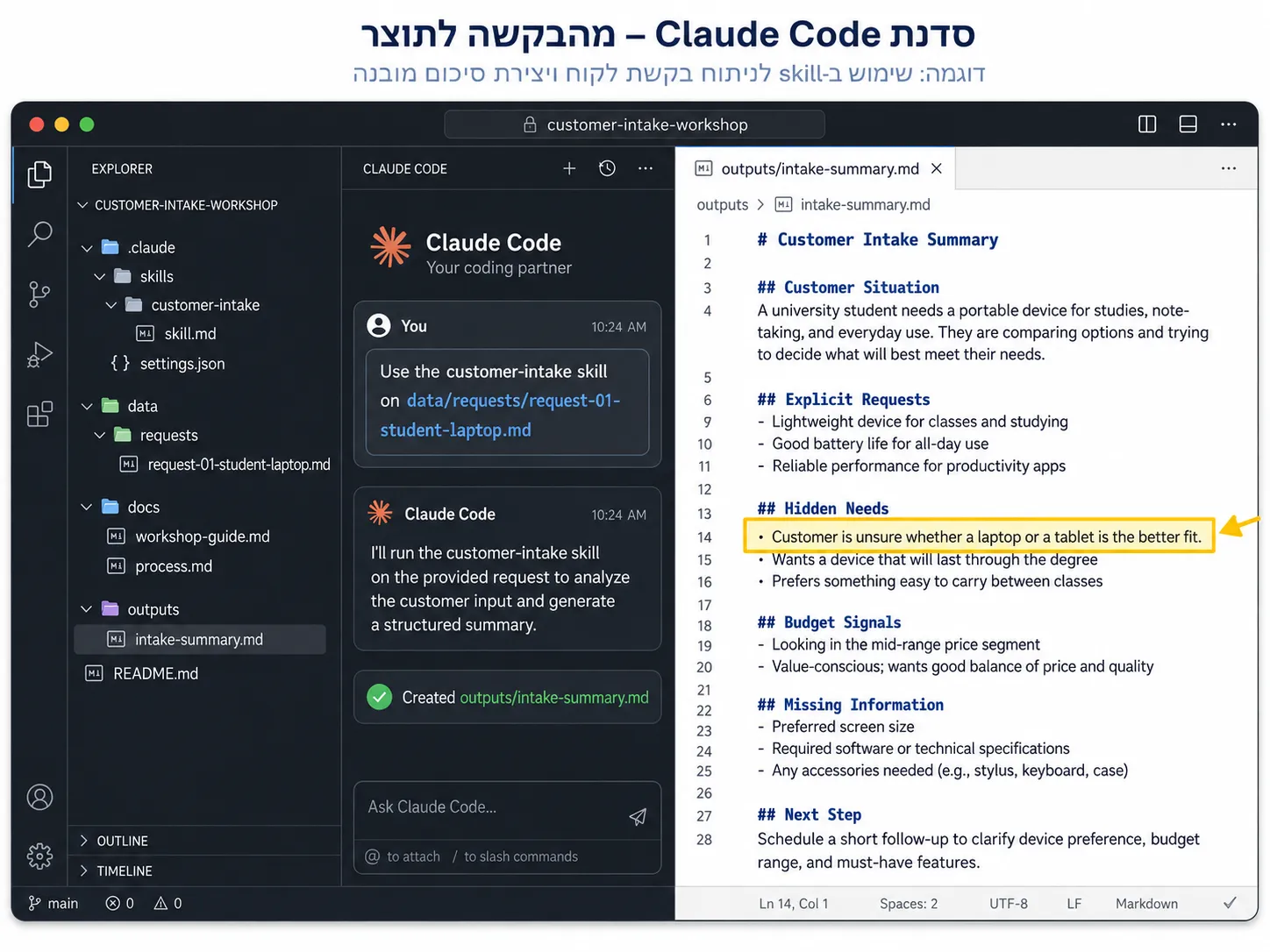
Use the customer-intake skill on data/requests/request-01-student-laptop.md.
לחילופין – ניתן להשתמש גם בפקודה הבאה (אם היא לא זמינה – יש צורך לטעון את ה skills מחדש, באחת מהדרכים שפורטו לעיל):/customer-intake data/requests/request-01-student-laptop.md
שימו לב: מנגנון ה skills של Claude Code חושף כל skill גם כפקודת slash באופן אוטומאטי. לחיצה על slash בחלון השיחה תציג את רשימת כל הפקודות וה skills שנטענו. אם ה skill לא זמין בתפריט – יש לטעון מחדש את כל ה skills.
- בדיקת התוצר:
עם סיום יצירת התוצר, Claude Code עשוי לבקש אישור לפתוח את הקובץ בדפדפן. אם הוא לא –
פתחו את הקובץ שנוצר בדפדפן, וודאו שהוא עומד בכל הקריטריונים הבאים:
- משתמש במבנה הקבוע שהגדרנו (כל הכותרות מופיעות).
- אינו ממליץ על מוצר סופי, אך מתייחס למלאי שבקטלוג
- מזהה את ההתלבטות בין לפטופ לטאבלט.
- מזהה שהתקציב אינו מוגדר במדויק.
- מזהה שיש גם צורך במטען Samsung.
- מסיים בשאלת המשך או ב-next step ברור.
- שומר באדיקות על הגדרות הטמפלייט
- בדיקת עקביות:
אחת המטרות העיקריות בהגדרת Skills היא עקביות בתוצר.
הריצו את הפקודה הבאה – לטיפול בפניית הלקוח השני:/customer-intake data/requests/request-02-small-business.md
המתינו לפתיחת התוצר והשוו להרצה הקודמת. האם התוצאות עקביות?
הוספת בדיקת איכות אוטומטית
אחד העקרונות החזקים בעבודה עם Skills הוא ש-Skill מייצר artifact (תוצר), ועל ה-artifact הזה ניתן להריץ בדיקה דטרמיניסטית. נוסיף סקריפט שבודק שהקובץ עומד במבנה הבסיסי. המטרה כאן אינה לבנות מערכת בדיקות מלאה, אלא להמחיש את העיקרון – הבדיקה הדטרמניסטית תתבצע אוטומטית עם כל יצירת קובץ artifact, ורק אם הבדיקה עוברת בהצלחה – הוא יפתח בדפדפן. אחרת – התהליך יחזור לסבב תיקונים.
- יצירת קובץ הבדיקה:
- צרו קובץ חדש תחת תיקיית הסקיל:
.claude/skills/customer-intake/check-html-output.js - העתיקו לתוכו את הקוד הבא, שבודק שכל הכותרות המרכזיות קיימות בקובץ הפלט:
#!/usr/bin/env node const fs = require("fs"); const path = require("path"); const logPath = path.join("outputs", "customer-intake-validation.log"); function writeLog(message) { const line = `[${new Date().toISOString()}] ${message}\n`; fs.mkdirSync("outputs", { recursive: true }); fs.appendFileSync(logPath, line); } function fail(message) { writeLog("FAILED\n" + message); console.error(`Customer intake HTML validation failed:\n${message}`); process.exit(1); } function pass(filePath) { writeLog(`PASSED ${filePath}`); console.log(`Customer intake HTML validation passed: ${filePath}`); process.exit(0); } const filePath = process.argv[2]; if (!filePath) { fail( "Missing file path.\n\nUsage:\nnode .claude/skills/customer-intake/check-html-output.js outputs/customer-intake-request-01-student-laptop.html" ); } writeLog(`START validation for ${filePath}`); const normalized = filePath.replace(/\\/g, "/"); const isValidTarget = normalized.startsWith("outputs/customer-intake-") && normalized.endsWith(".html"); if (!isValidTarget) { fail( `Invalid target file: ${filePath}\n\nExpected a file matching:\noutputs/customer-intake-*.html` ); } const absolutePath = path.resolve(filePath); if (!fs.existsSync(absolutePath)) { fail(`File does not exist: ${filePath}`); } const html = fs.readFileSync(absolutePath, "utf8"); const requiredFragments = [ "", "
- צרו קובץ חדש תחת תיקיית הסקיל:
- עדכון הבדיקה האוטומאטית ב Skill:
בקובץ הוראות הסקילSKILL.md, חפשו את הכותרת## Browser opening requirements, והחליפו אותה (ואת הטקסט שתחתיה) בתוכן הבא:## Quality check requirement After creating the HTML report, always run the validation script on the exact output file you created. Use this command, replacing the path with the actual generated file path: ```bash node .claude/skills/customer-intake/check-html-output.js "outputs/customer-intake-.html" ``` Validation must happen before opening the file in the browser. If validation fails: 1. Read the validation error and reflect to the user what is wrong with the HTML file. 2. Fix the generated HTML file. 3. Run the validation script again. 4. Repeat until validation passes. 5. Only after validation passes, open the HTML file in the browser. Do not treat the skill workflow as complete until the HTML validation passes. After validation passes, open the file. ## Browser opening requirement After creating the HTML file, immediately open it in the default browser, using the actual generated file path. Important: Never open the HTML file before the validation script passes. - הרצת הבדיקה:
- מחקו את הקבצים שנוצרו בתיקיית output, והכניסו את הפרומפט הבא:
/customer-intake data/requests/request-01-student-laptop.md - אם הבדיקה עברה בהצלחה – הקובץ ייפתח בדפדפן, אחרת יתקבלו הודעות שגיאה בחלון הצ׳אט, ויתחיל תהליך התיקון. כל פעולת בדיקה מתועדת בקובץ
logחדש שנוסף לתיקייתoutputs, למעקב אחר ביצוע הבדיקות. כך הדגמנו כיצד יכולת AI (ה-Skill) משולבת עם בדיקה לוגית ודטרמיניסטית.
- מחקו את הקבצים שנוצרו בתיקיית output, והכניסו את הפרומפט הבא:
- אתגר:
נסו לגרום ל HTML להשבר, ולבדיקה להכשל – תוכלו לעשות זאת ע״י ״הקשחת״ קריטריוני הבדיקה. העזרו בקלוד-קוד לצורך כך. האם לאחר סבבי הכשל והתיקונים – קבלתם פלט תקני?
יצירת Skill נוסף בעזרת skill-creator
לאחר שבנינו Skill ידנית והבנו את המבנה לעומק, נכיר דרך נוספת ומהירה יותר. נשתמש ב-skill-creator כדי לבנות Skill חדש. הפעם המטרה היא לקבל את ה-intake summary ואת קטלוג המוצרים, ולהחזיר רשימה מצומצמת של 2 עד 3 מוצרים מתאימים בלבד.
- בקשת יצירת ה-Skill:
- הריצו ב-Claude Code את הבקשה הבאה:
Use the skill-creator to build a new skill named product-shortlist. It receives an intake summary and the product catalog, and returns a shortlist of only 2 to 3 matching products. It must only use products from data/catalog/products.json, must not invent products, should mention price and stock only if they exist in the catalog, briefly explain each match, note tradeoffs between alternatives, and must NOT write a final answer to the customer yet.
שימו לב: בחלק מגרסאות Claude Code for VS Code אפשרות זו נקראתrun-skill-generator(ולא skill-creator). כדי לוודא – כתבו slash בחלון השיחה וראו איזו פקודה זמינה עבורכם.
- הריצו ב-Claude Code את הבקשה הבאה:
- עקרונות שה-Skill חייב לשמור עליהם:
- לא להמציא מוצרים – רק כאלה הקיימים בקטלוג.
- להשתמש אך ורק במוצרים מתוך
data/catalog/products.json. - לציין מחיר ומלאי רק אם הם קיימים בקטלוג.
- להסביר בקצרה את ההתאמה של כל מוצר.
- לציין את ה-tradeoff בין החלופות השונות.
- לא לנסח עדיין תשובה סופית ללקוח.
- בדיקה ועריכה:
- לאחר ש-skill-creator יוצר את ה-Skill תחת
.claude/skills/product-shortlist/, פתחו את קובץ ה-SKILL.mdשנוצר ובדקו שהוא תופס את כל העקרונות שהגדרנו. תקנו ידנית במידת הצורך.
- לאחר ש-skill-creator יוצר את ה-Skill תחת
בדיקת שני ה-Skills יחד בתהליך מלא
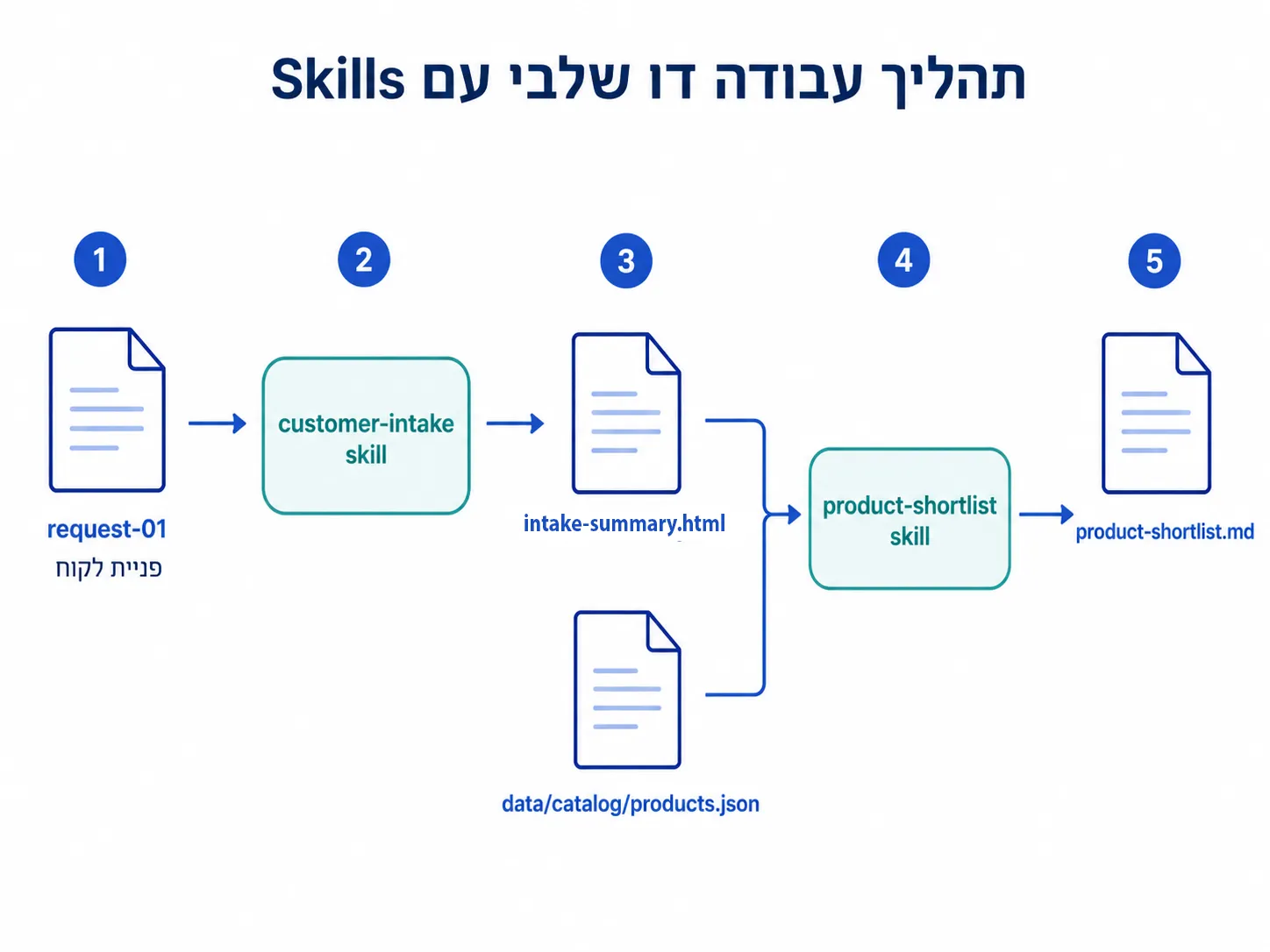
כעת, כשיש לנו שתי יכולות מקצועיות, נחבר אותן לתהליך קצר ורציף. ראשית נריץ את ה-intake, נשמור את התוצר, ואז נריץ עליו את ה-shortlist. זוהי הצצה ראשונה לאופן שבו יכולות נפרדות מתחברות לתהליך עבודה.
- שלב הקליטה (Intake):
- הריצו את ה-Skill הראשון על פניית הלקוח ושמרו את התוצר:
Use the customer-intake skill on data/requests/request-01-student-laptop.md
- הריצו את ה-Skill הראשון על פניית הלקוח ושמרו את התוצר:
- שלב הסינון (Shortlist):
- הריצו את ה-Skill השני על בסיס ה-intake שנוצר ועל הקטלוג:
Use the product-shortlist skill based on outputs/customer-intake-request-01-student-laptop.html and data/catalog/products.json. Save the result to outputs/product-shortlist.md.
- הריצו את ה-Skill השני על בסיס ה-intake שנוצר ועל הקטלוג:
- בדיקת התוצרים:
- ודאו שבתיקיית
outputs/נוצרו שני הקבצים:
outputs/ outputs/customer-intake-request-01-student-laptop.html product-shortlist.md - בדקו ש-
product-shortlist.mdמכיל רק 2 עד 3 מוצרים שלקוחים מהקטלוג בלבד, עם הסבר תמציתי ו-tradeoff, וללא ניסוח תשובה סופית ללקוח.
- ודאו שבתיקיית
- מה הלאה?
כרגע יצרנו תהליך עבודה נוסף, קונספטואלי, שמערב שימוש סדרתי בשני skills. במידה ונזהה, במהלך הזמן, שסדרת פעולות זו היא עקבית – נוכל ליצור Skill נוסף שמריץ את התהליך המלא בבת אחת. זו האומנות בזיהוי תהליכים חוזרים וחשיבה פרוצדורלית.
עקרונות מנחים ומבט קדימה
לאורך כל התרגול שמרנו על מספר עקרונות חשובים שכדאי לזכור גם בעבודה עצמאית עם Skills.
- יצירה ידנית מול אוטומציה:
- בנינו את ה-Skill הראשון ידנית, כדי להבין לעומק את המבנה. רק לאחר מכן השתמשנו ב-skill-creator לקיצור התהליך.
- Skills הם יכולות, לא סוכנים:
- חשוב להפנים שבשלב זה בנינו יכולות מקצועיות חוזרות בלבד. עדיין אין לנו צוות agents עם תפקידים מוגדרים. ה-Skills הם אבני הבניין שנשתמש בהן בהמשך.
- תוצר ובדיקה הולכים יחד:
- כל Skill מייצר artifact, וראינו שאפשר לחבר אליו בדיקה דטרמיניסטית פשוטה שמוודאת עמידה במבנה.
לסיכום, בחלק הראשון לימדנו את Claude Code להבין את הפרויקט שלנו. בחלק השני התחלנו ללמד אותו יכולות מקצועיות חוזרות, ובנינו שני Skills שעובדים יחד בתהליך רציף. המעבר מ-prompt חד פעמי ליכולת קבועה הוא קפיצת מדרגה משמעותית באופן שבו אנחנו עובדים עם כלי AI.
השלב הבא בסדנה יהיה המרתק מכולם: ניקח את היכולות שבנינו ונחבר אותן לסוכנים (agents) עם תפקידים ברורים, וכך נתחיל לבנות זרימות עבודה אג'נטיות אמיתיות. נתראה שם!