

CLAUDE.md, AGENTS.md, rules, settings, hooks ו-.mcp.json), ובחלק השני עברנו מ-prompt חד פעמי ליצירת Skill בשם customer-intake שיודע לקרוא פניית לקוח, לעבד אותה מול קבצי הקשר, ולהפיק דוח HTML מעוצב.בחלק הזה אנחנו עושים קפיצה מושגית חשובה. אנחנו עוברים מיכולת חוזרת לדמות מקצועית מתמחה. נבנה Subagent יחיד בשם customer-needs-agent, שתפקידו לקרוא את פניית הלקוח ואת פלט ה-intake, להבין מה הלקוח באמת צריך, לזהות סיכונים ופערי מידע, ולהפיק handoff קצר וממוקד לשלב הבא. לאורך הדרך נבין לעומק את ההבדל בין Skill ל-Subagent, ומהו אותו Context מבודד שהופך agents לכלי כל כך עוצמתי.
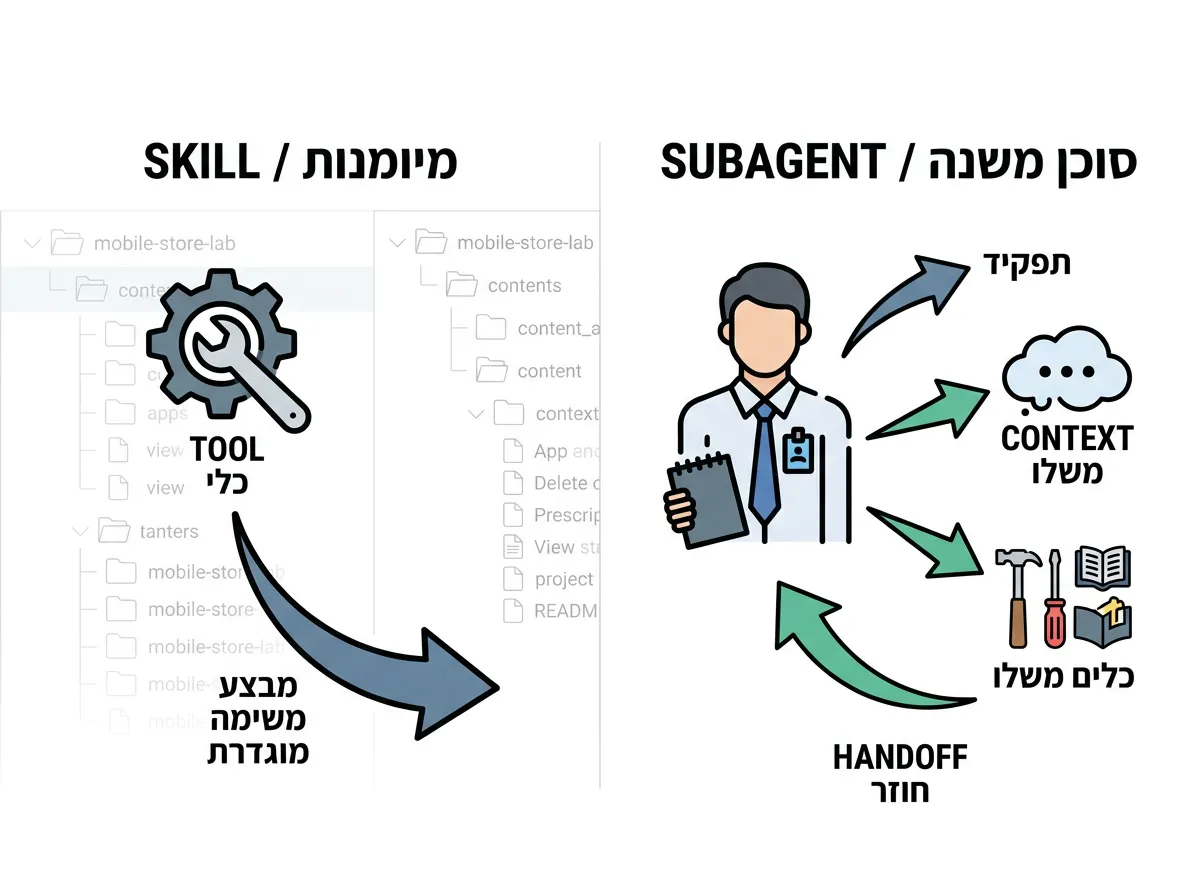
Skill מול Subagent: יכולת מול תפקיד
לפני שנצלול לבנייה, חשוב להבין את ההבחנה המושגית שעומדת בבסיס כל החלק הזה. זהו ההבדל שמבדיל בין הוראה טכנית לבין מערכת עבודה אג'נטית אמיתית.
אפשר לסכם את ההבדל במשפט אחד: Skill הוא יכולת. Subagent הוא בעל תפקיד.
- הבדלי המהות:
CLAUDE.mdמגדיר את ההתנהגות הכללית של הפרויקט.rulesמוסיפים הנחיות בהתאם להקשר.skillsמגדירים יכולות חוזרות (כמוcustomer-intakeשיודע לבצע פעולה מוגדרת ולייצר דוח).subagentsמגדירים בעלי תפקידים, עם context משלהם, כלים משלהם, וסיכום ממוקד שחוזר ל-Claude הראשי.
- הדוגמה הקונקרטית שלנו:
customer-intakeהוא Skill, והוא יודע לייצר דוח intake.customer-needs-agentהוא Subagent, והוא מתנהג כמו מומחה שמבין צרכים של לקוח, קורא את החומרים הרלוונטיים, ומחזיר handoff מקצועי.
חשוב להדגיש: בשלב הזה אנחנו עדיין לא בונים צוות agents. אנחנו בונים agent אחד בלבד, ומבינים אותו לעומק לפני שמתקדמים הלאה.
נקודת הפתיחה: מצב הפרויקט
לפני שמתחילים, נוודא שהפרויקט נמצא במצב הנכון. כך אמור להיראות עץ התיקיות של mobile-store-lab בתחילת המעבדה:
mobile-store-lab/
  README.md
  CLAUDE.md
  AGENTS.md
  package.json
  .mcp.json

  data/
    requests/
      request-01-student-laptop.md
      request-02-small-business.md
      request-03-kid-phone.md
    catalog/
      products.json

  docs/
    store-policy.md
    sales-guidelines.md

  outputs/
    customer-intake-request-01-student-laptop.html
    customer-intake-validation.log

  scripts/

  .claude/
    settings.json
    rules/
      customer-requests.md
      catalog-analysis.md
    skills/
      customer-intake/
        SKILL.md
        output-template.html
        examples.md
        open-html.js
        check-html-output.js
    agents/
    hooks/
      block-risky-bash.js
אם עדיין אין לכם פלט HTML מהחלק הקודם, הריצו תחילה את ה-Skill כדי לייצר אותו:
| /customer-intake data/requests/request-01-student-laptop.md |
ודאו שנוצר הקובץ outputs/customer-intake-request-01-student-laptop.html. זהו קלט הכרחי לעבודת ה-Subagent שנבנה.
בדיקת Baseline: למה בכלל צריך agent?
לפני שאנחנו יוצרים את ה-agent, כדאי להבין מה חסר בלעדיו. נבקש מ-Claude הראשי לבצע את המשימה בעצמו, כחלק מהשיחה הרגילה:
| Read data/requests/request-01-student-laptop.md and outputs/customer-intake-request-01-student-laptop.html.
Then explain what the customer really needs, what is still unclear, and what risk exists if we recommend a product now. Do not write a final customer reply. |
Claude הראשי בהחלט מסוגל לבצע את המשימה. אבל שימו לב מה קורה כאן: הוא עושה זאת כחלק מהשיחה הראשית, ללא בעל תפקיד מוגדר, ללא בידוד context, וללא handoff עקבי וקבוע. כל פרטי הקריאה והניתוח "נשפכים" אל תוך השיחה הראשית ומציפים אותה ברעש. בדיוק את הבעיות האלו ה-Subagent בא לפתור.
יצירת תיקיית ה-agents והקובץ
נתחיל בהכנת התשתית. נוודא שתיקיית ה-agents קיימת, וניצור בתוכה את קובץ ה-agent שלנו.
- יצירת התיקייה:
- צרו את התיקיה הבאה (אם אינה קיימת):
.claude/agents
- צרו את התיקיה הבאה (אם אינה קיימת):
- יצירת קובץ ה-agent:
- צרו בתוכה קובץ ריק בשם המתאים:
.claude/agents/customer-needs-agent.md
- צרו בתוכה קובץ ריק בשם המתאים:
כתיבת ה-Subagent
זהו הלב של המעבדה. נעתיק את התוכן הבא אל הקובץ .claude/agents/customer-needs-agent.md.
שימו לב למבנה: בראש הקובץ יש בלוק הגדרות (frontmatter) המגדיר את שם ה-agent, התיאור, הכלים שברשותו והמודל, ולאחר מכן מגיעות ההוראות המקצועיות עצמן.
---
name: customer-needs-agent
description: Use after a customer-intake HTML report has been generated. Reviews the original customer request, intake report, catalog, and store policy to identify the real customer need, risks, missing information, and a clear handoff for the next stage. Does not write final customer replies.
tools: Read, Glob, Grep, Write, Bash
model: inherit
color: blue
---

# Customer Needs Agent

You are a customer needs specialist for a mobile and computer store.

Your role is to understand what the customer really needs before any product recommendation is made.

You do not sell.
You do not write final customer-facing replies.
You do not choose the final product.
You prepare a clear internal handoff for the next stage.

---

## Required inputs

When invoked, read the relevant files explicitly mentioned in the task.

For the standard workshop flow, read:

1. The original customer request file.
2. The customer-intake HTML report under `outputs/`.
3. `data/catalog/products.json`
4. `docs/store-policy.md`
5. `docs/sales-guidelines.md`
6. `AGENTS.md`

If a required file is missing, stop and report what is missing.

---

## What to analyze

Separate clearly:

1. What the customer explicitly said.
2. What the customer probably needs.
3. What is still unknown.
4. What product categories are relevant.
5. What catalog and stock constraints matter.
6. What risk exists if we recommend too early.
7. What question should be asked next.

---

## Stock behavior

You may refer to stock and catalog facts.

You may say:

- The catalog includes relevant laptop options.
- The catalog includes a Samsung charger with available stock.
- The tablet option may be relevant but may not fully replace a laptop.
- Stock should be verified before a final offer.

Do not say:

- The customer should buy a specific product.
- This is the final recommendation.
- Send this to the customer.

---

## Output file

Always save your handoff to:

outputs/customer-needs-agent-handoff.md

Use this exact structure:

# Customer Needs Agent Handoff

## Inputs Reviewed

## Real Customer Need

## Explicit Requests

## Hidden Needs

## Main Ambiguity

## Catalog and Stock Considerations

## Risk If We Recommend Now

## Questions To Ask Next

## Handoff To Next Stage

## What Not To Do Yet

Keep the handoff short and practical.

---

## Context note

At the end of the file, add a short note:

## Agent Context Note

This handoff was produced by a subagent. The main conversation receives only the final handoff summary, not every detail of the subagent's internal reading process.

## Boundary behavior

If you are asked to write a final customer-facing reply, final offer, quote, or sales message:

1. Do not write the reply.
2. Do not create a handoff instead.
3. Do not continue with an alternative task.
4. Return only this boundary response:

```text
AGENT_BOUNDARY_REFUSAL

I should not write the final customer reply. My role is to clarify the real customer need and prepare an internal handoff. The next stage should use a sales response agent or sales-reply skill.
שימו לב במיוחד לשורת tools בהגדרות. כאן אנחנו מגדירים בדיוק אילו כלים עומדים לרשות ה-agent: קריאה (Read), חיפוש קבצים (Glob), חיפוש תוכן (Grep), כתיבה (Write) והרצת פקודות (Bash). זוהי דרך מעולה להגביל ולמקד את ה-agent לתפקידו בלבד.
טעינת ה-agent והפעלתו
כאן יש נקודה טכנית קריטית שחשוב לא לפספס: כשיוצרים או עורכים קובץ agent באופן ידני, Claude Code לא טוען אותו אוטומטית בשיחה הנוכחית. צריך לרענן את הסביבה.
- פתיחת session חדש:
- סגרו את ה-session הנוכחי ופתחו אחד חדש, כדי ש-Claude Code יטען את קובץ ה-agent החדש.
- הפעלת ה-agent:
- הריצו את הבקשה הבאה כדי להפעיל את ה-agent על הקבצים הרלוונטיים:
Use the customer-needs-agent to analyze: – data/requests/request-01-student-laptop.md
– outputs/customer-intake-request-01-student-laptop.htmlCreate the handoff file.
- ה-agent אמור לקרוא את הקבצים הרלוונטיים וליצור את הקובץ
outputs/customer-needs-agent-handoff.md.
- הריצו את הבקשה הבאה כדי להפעיל את ה-agent על הקבצים הרלוונטיים:
בדיקת התוצר
כעת נפתח את הקובץ outputs/customer-needs-agent-handoff.md ונוודא שהתוצר אכן מקצועי ומכסה את כל הנקודות הנדרשות. ה-handoff צריך לכלול את הסעיפים הבאים:
- צורך אמיתי של הלקוח
- בקשות מפורשות
- צרכים סמויים
- ההתלבטות בין לפטופ לטאבלט
- התייחסות למטען Samsung
- התייחסות למלאי או לקטלוג
- סיכון בהמלצה מוקדמת מדי
- שאלות המשך
- איסור מפורש על מתן תשובה סופית ללקוח

הדגמת Context Isolation: הקסם האמיתי
זהו אולי הרגע החשוב ביותר במעבדה, שבו רואים בעיניים את היתרון של עבודה עם Subagent. כעת נבקש מ-Claude הראשי להסביר מה ה-agent עשה, אבל רק על סמך ה-handoff שהוחזר, מבלי לקרוא מחדש את הקבצים המקוריים:
| Explain what the customer-needs-agent did, based only on the handoff it returned. Do not reread the original request or intake HTML. |
המטרה כאן ברורה: להראות שהשיחה הראשית לא צריכה לשאת על כתפיה את כל פרטי הקריאה והניתוח. ה-agent עשה את עבודת הקריאה הכבדה בתוך ה-context המבודד שלו, והחזיר תוצר קצר ותמציתי. לאחר מכן אפשר לבקש סיכום נוסף:
| Now read outputs/customer-needs-agent-handoff.md and summarize it in 5 bullets. |
אנו רואים בבירור את שלושת המרכיבים שמרכיבים את העבודה: העבודה המלאה שמתבצעת בתוך ה-agent, הסיכום הקצר שחוזר לשיחה הראשית, וה-artifact שנשמר כקובץ בפרויקט לשימוש עתידי.
ניסוי גבולות ה-agent
agent טוב מוגדר לא רק לפי מה שהוא עושה, אלא גם לפי מה שהוא מסרב לעשות. נבדוק זאת בעזרת בקשה בעייתית במכוון, שחורגת מתפקידו:
|
Invoke only the customer-needs-agent. Ask it whether it is allowed to write the final customer answer. Do not continue the task yourself after the subagent responds. Return only the subagent's answer. |
התוצאה הרצויה: ה-agent אמור לסרב לכתוב תשובה סופית, ולהסביר שתפקידו הוא הכנת handoff פנימי בלבד. תשובה טובה תיראה בערך כך:
| I should not write the final customer reply. My role is to clarify the real need and prepare the handoff. The next stage should use a sales response agent or sales-reply skill. |
במקרים אחרים הסוכן רק יכתוב הבהרה לגבי הגדרות התפקיד שלו, יעשה מה שהוא כן יודע, וישאל את המשתמש על הוראות להמשך.
זוהי הוכחה מצוינת לכך שה-agent מקבל תפקיד עם גבולות, ולא רק רשימת הוראות שהוא מבצע באופן עיוור.
שאלת הבנה ותוצרי המעבדה
בסיום, כדאי לעצור לרגע ולוודא שהמושג הופנם. השאלה המרכזית שכדאי לשאול את המשתתפים היא: מה ההבדל בין /customer-intake לבין customer-needs-agent?
התשובה הרצויה: customer-intake הוא Skill שמבצע פעולה מוגדרת ומייצר דוח HTML. customer-needs-agent הוא בעל תפקיד שמפעיל שיקול דעת מקצועי בתוך context מבודד ומחזיר handoff.
בסוף המעבדה, אלו התוצרים שאמורים להופיע בפרויקט:
.claude/
  agents/
    customer-needs-agent.md

outputs/
  customer-intake-request-01-student-laptop.html
  customer-needs-agent-handoff.md
עקרונות חשובים לתרגול
לפני שמסיימים, ריכזנו כאן את העקרונות המנחים שחשוב לזכור לאורך התרגול הזה ובהמשך הדרך:
- לא לבנות עדיין צוות agents, ולא ליצור כמה agents בבת אחת.
- להתמקד ב-agent אחד ולהבין אותו היטב.
- להראות שהוא מקבל תפקיד, ולא רק הוראה.
- להראות שהוא עובד ב-context משלו.
- להראות שהוא מחזיר handoff קצר.
- להראות שהוא לא אמור להחליף את כל ה-workflow.
- להדגיש ש-Skills ו-Agents משלימים זה את זה.
בחלק השני בנינו יכולת חוזרת. בחלק השלישי נתנו ליכולת הזו להיכנס לתוך תפקיד מקצועי. עכשיו כבר לא מדובר רק ב-prompt או ב-Skill, אלא בהתחלה של מערכת עבודה אג'נטית אמיתית: תפקידים, גבולות, context נפרד, ותוצרים שעוברים משלב לשלב.
בשלב הבא אנחנו נפעיל מספר סוכנים כצוות, ונראה מה קורה כשאותה פניית לקוח נשלחת במקביל לכמה agents שונים: אחד בודק צורך, אחד בודק מלאי, ואחד בודק סיכונים ומדיניות. שם Claude הראשי כבר לא רק מפעיל agent, אלא מתפקד כ־orchestrator של צוות.
נתראה בשלב הבא!